Microsoft Copilot Is Reading Your Confidential Emails: What the DLP Bypass Means for Your Organization
A Copilot bug bypassed DLP policies to summarize confidential emails. With 16% of business-critical data overshared and 802K files at risk per org, here's how to lock down your Microsoft 365 environment.
TL;DR
| Key Point | Summary |
|---|---|
| Copilot DLP bypass | Bug CW1226324 caused Copilot Chat to summarize confidential emails despite sensitivity labels and DLP policies |
| Root cause | Code issue allowed Copilot to process sent items and drafts with confidential labels |
| Oversharing at scale | 16% of business-critical data is overshared; 802K files at risk per organization on average |
| Sensitivity label gaps | Even when working correctly, labels don't restrict Copilot in Teams or Copilot Chat |
| Microsoft's fix | Rolling remediation began early February 2026; full timeline not yet disclosed |
Quick Answer: On February 18, 2026, The Register reported that Microsoft 365 Copilot Chat had been summarizing emails marked as "confidential" despite Data Loss Prevention policies being in place. Microsoft acknowledged the bug (tracked as CW1226324, first reported January 21, 2026) and began rolling out fixes. But this incident exposes a deeper problem: most organizations have massive oversharing issues in SharePoint and Exchange that Copilot magnifies. Microsoft's own blueprint recommends a phased approach to address these risks before and during Copilot deployment.
If your organization uses Microsoft 365 Copilot, there's a good chance it has already accessed data it shouldn't have. A confirmed bug allowed Copilot to bypass your DLP controls and summarize confidential emails. And even without the bug, the underlying oversharing problem in most Microsoft 365 environments means Copilot can surface sensitive data simply because permissions are too broad.
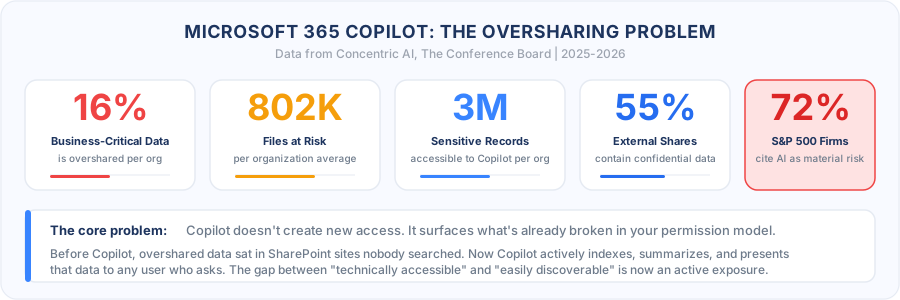
This isn't an edge case. According to a Concentric AI analysis of over 550 million records, 16% of an organization's business-critical data is overshared, averaging 802,000 files at risk per organization. Copilot doesn't create new access. It surfaces what's already broken in your permission model, faster and more efficiently than any human could.
The Bug: Copilot Ignoring DLP on Confidential Emails
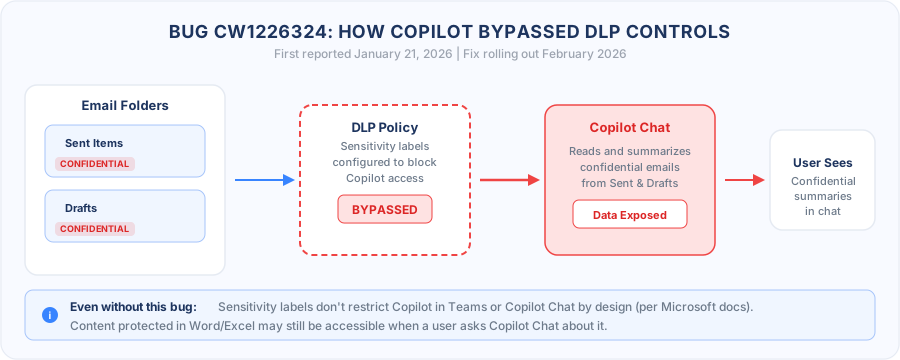
On February 18, 2026, The Register reported that Microsoft 365 Copilot Chat had been summarizing emails bearing "confidential" sensitivity labels, despite DLP policies explicitly configured to prevent this.
Microsoft acknowledged the issue in a notice to Office administrators tracked as CW1226324. Customers first reported the behavior on January 21, 2026. The bug was reposted by the UK's National Health Service support portal, indicating it affected organizations handling highly sensitive data.
What Went Wrong
Microsoft's official description:
"Users' email messages with a confidential label applied are being incorrectly processed by Microsoft 365 Copilot chat. The Microsoft 365 Copilot 'work tab' Chat is summarizing email messages even though these email messages have a sensitivity label applied and a DLP policy is configured."
The root cause was a code issue that allowed items in the Sent Items and Drafts folders to be picked up by Copilot even though confidential labels were applied. This means every email you drafted or sent with a confidentiality label was potentially being summarized and surfaced in Copilot Chat responses.
The Fix Status
Microsoft began rolling out a remediation in early February 2026 and is contacting affected customers. However, the company has not disclosed how many users or organizations were affected and has not provided a final timeline for full remediation.
The Bigger Problem: Oversharing Across Microsoft 365
The DLP bypass bug is concerning, but it's a symptom of a much larger issue. Even when DLP and sensitivity labels work correctly, Copilot can access anything the user can access. And in most Microsoft 365 environments, users can access far more than they should.
The Numbers Are Alarming
Analysis of enterprise Microsoft 365 environments reveals the scale of the oversharing problem:
- 16% of business-critical data is overshared across the organization
- 802,000 files at risk per organization on average due to oversharing
- 3 million sensitive records per organization are accessible to Copilot
- 55% of externally shared files contain confidential data
- 72% of S&P 500 companies now cite AI as a material risk in regulatory filings
Common Oversharing Patterns
Microsoft's own blueprint identifies the most common causes of oversharing in SharePoint:
- Site privacy settings granting access to "Everyone in the organization"
- Default sharing options set to "Everyone" instead of restricted groups
- Broken permission inheritance where child items don't follow parent restrictions
- "Everyone except external users" domain group applied to sensitive content
- Missing sensitivity labels on sites and files that contain regulated data
Sensitivity Labels Have Gaps
Here's what many admins don't realize: even when sensitivity labels are correctly applied and DLP policies are configured, content remains available to Copilot in certain contexts.
From Microsoft's own documentation:
"Although content with the configured sensitivity label will be excluded from Microsoft 365 Copilot in the named Office apps, the content remains available to Microsoft 365 Copilot for other scenarios. For example, in Teams, and in Microsoft 365 Copilot Chat."
This means your confidential documents might be protected in Word and Excel but fully accessible when a user asks Copilot Chat about them, or when they're referenced in a Teams conversation.
Microsoft's Oversharing Blueprint: A 3-Phase Approach
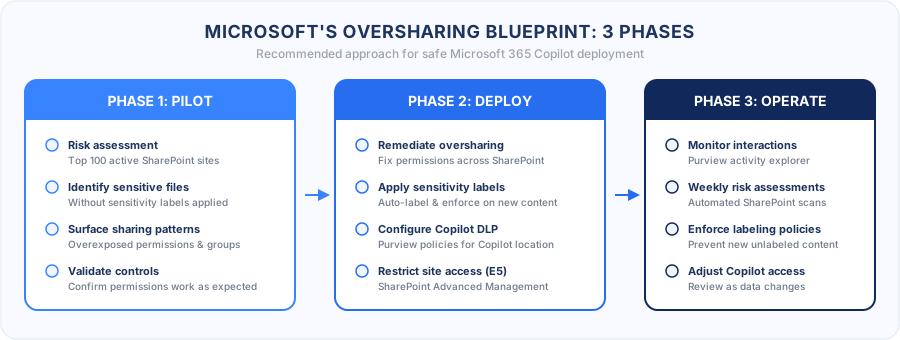
Microsoft published a deployment blueprint specifically to address oversharing concerns. It breaks the remediation into three phases:
Phase 1: Pilot (Optional)
- Run a data risk assessment on your top 100 most active SharePoint sites
- Identify sites with sensitive files lacking sensitivity labels
- Surface overexposed sharing patterns before Copilot deployment
- Validate that permission controls work as expected
Phase 2: Deploy
- Remediate identified oversharing issues across SharePoint and Exchange
- Apply sensitivity labels to unlabeled content containing sensitive data
- Configure DLP policies specific to Copilot interactions
- Use SharePoint Advanced Management (SAM) for E5 customers to restrict site-level access
- Deploy Microsoft Purview adaptive DLP policies that automatically include/exclude sites from Copilot's reach
Phase 3: Operate
- Monitor Copilot interactions for sensitive data usage through Purview activity explorer
- Run weekly automated risk assessments on active SharePoint sites
- Enforce labeling policies to prevent new unlabeled sensitive content
- Review and adjust Copilot access as organizational data changes
Why This Matters for Compliance
If your organization is SOC 2 or ISO 27001 certified, the Copilot oversharing problem directly impacts several control areas.
Access Control Failures
Copilot operates with the user's existing permissions. If permissions are overly broad (which they are in most orgs), Copilot effectively gives every user a powerful search engine across all accessible data. This undermines:
- SOC 2 CC6.1 — Logical access controls requiring least-privilege access
- SOC 2 CC6.3 — Role-based access restrictions
- ISO 27001 A.5.15 — Access control policy requiring need-to-know restrictions
- ISO 27001 A.8.3 — Information access restriction requirements
Data Classification Gaps
The sensitivity label limitations with Copilot Chat and Teams create a gap between your documented data classification controls and actual enforcement:
- SOC 2 CC6.7 — Restriction on information output and handling
- ISO 27001 A.5.12 — Classification of information
- ISO 27001 A.5.13 — Labeling of information
- GDPR Article 32 — Appropriate technical measures for data protection
Audit Trail Concerns
When Copilot surfaces confidential data, the user who receives it may not know the original sensitivity context. This creates gaps in your audit trail and data handling documentation.
For more on mapping AI risks to compliance controls, see our guide on AI agent security guardrails for SOC 2 and ISO 27001.
Bastion's Recommendations
1. Audit Your SharePoint Permissions Immediately
Don't wait for a Copilot incident to discover your oversharing exposure. Run Microsoft Purview's Data Security Posture Management (DSPM) assessment:
- Review the top 100 most active SharePoint sites for oversharing
- Identify sites using "Everyone" or "Everyone except external users" permissions
- Check for broken permission inheritance
- Document all sites with sensitive data that lack sensitivity labels
2. Fix the DLP Gap for Copilot Chat
Until Microsoft fully remediates CW1226324 and the broader sensitivity label limitations:
- Create Copilot-specific DLP policies in Microsoft Purview targeting the Copilot location
- Configure policies to block Copilot from processing content with specific sensitivity labels
- Test that DLP enforcement works in Teams and Copilot Chat, not just Office apps
- Monitor Purview activity explorer for Copilot interactions with labeled content
3. Apply Sensitivity Labels Before Deploying Copilot
The single most effective control: label everything before Copilot can access it.
- Enable auto-labeling policies in Microsoft Purview to classify sensitive content
- Require mandatory labeling for all new SharePoint sites
- Retroactively label existing content using Purview's trainable classifiers
- Verify labels are applied to Sent Items and Drafts (the vectors in CW1226324)
4. Restrict Copilot Access at the Site Level
For E5 customers, use SharePoint Advanced Management to:
- Restrict Copilot access on specific sites containing regulated data
- Set site-level access policies that override user permissions for AI processing
- Configure adaptive DLP policies that automatically adjust as site attributes change
For E3 customers:
- Use SharePoint site-level permissions to restrict access to sensitive document libraries
- Configure conditional access policies to limit Copilot availability for users handling regulated data
5. Implement the 3-Phase Blueprint
Follow Microsoft's oversharing blueprint:
- Pilot phase: Assess 100 sites, identify risks, validate controls
- Deploy phase: Remediate oversharing, enforce labeling, configure DLP
- Operate phase: Monitor continuously, run weekly risk assessments, adjust policies
6. Add Copilot to Your Risk Register
AI-assisted data processing changes your risk profile. Update your risk assessment to account for:
- Copilot surfacing legacy data that was effectively "hidden" by obscurity
- Sensitivity label enforcement gaps in Teams and Copilot Chat
- Third-party Copilot agents and plugins accessing organizational data
- The expanding attack surface as Copilot gains new integrations
7. Document Copilot Controls for Auditors
Your next SOC 2 audit or ISO 27001 surveillance audit will likely include questions about AI data access. Prepare documentation showing:
- How Copilot access aligns with your access control policies
- DLP policies configured for Copilot-specific scenarios
- Sensitivity label coverage across SharePoint, Exchange, and Teams
- Monitoring and incident response procedures for Copilot data exposures
- Evidence that the CW1226324 bug was assessed and remediated in your environment
The Bottom Line
The CW1226324 bug is a wake-up call, but not because of the bug itself. Bugs happen and get fixed. The real issue is that most organizations have years of accumulated oversharing in their Microsoft 365 environments, and Copilot is now surfacing all of it.
Before CopIlot, overshared data sat in SharePoint sites that nobody searched. Now Copilot actively indexes, summarizes, and presents that data to any user who asks. The difference between "technically accessible" and "easily discoverable" is the difference between a theoretical risk and an active exposure.
The organizations that deploy Copilot safely will be those that treat the deployment as a data governance project first and a productivity rollout second.
Need help assessing your Microsoft 365 data exposure before deploying Copilot? Bastion helps SaaS companies build security programs that account for AI data access risks. Get started today.
Sources
- The Register — Copilot Spills the Beans, Summarizing Emails It's Not Supposed to Read
- Microsoft Learn — Microsoft 365 Copilot Blueprint for Oversharing
- BleepingComputer — Microsoft Says Bug Causes Copilot to Summarize Confidential Emails
- Microsoft Learn — Learn About Sensitivity Labels
- Microsoft Learn — DLP for Microsoft 365 Copilot
- Concentric AI — Microsoft Copilot Data Risks Explained
- The Conference Board — 72% of S&P 500 Companies Disclose AI as Material Risk
- Fortune — S&P 500 Companies Disclosed AI Risk on 10-K Forms
- Microsoft Community Hub — Mitigate Oversharing to Govern Microsoft 365 Copilot and Agents
- Microsoft Learn — Microsoft 365 Copilot Data Protection Architecture
Share this article
Related Articles
Next.js CVE-2026-44578: WebSocket SSRF Exposes 79,000 Self-Hosted Servers
CVE-2026-44578 is an unauthenticated SSRF in the Next.js WebSocket upgrade handler. It affects self-hosted Next.js 13.4.13 through 16.2.4 and lets attackers reach cloud metadata services, internal admin panels, and any host on port 80. Here is the technical root cause, how to patch, and how to harden the cloud environment around it.
 Alban Veauté
Bastion is Now Live as an Official ChatGPT App
Bastion is the first security and compliance platform to ship as an official ChatGPT app. Manage policies, run your security program, and collaborate with your team on SOC 2 and ISO 27001 workflows without leaving ChatGPT.
 Arnaud Drizard
What Changed in SOC 2 for 2026: Zero-Trust, Continuous Monitoring, and the New Auditor Playbook
The SOC 2 framework has not been formally rewritten in 2026, but auditor expectations have. Quarterly access reviews, real-time evidence feeds, dynamic authorization, AI system attestations, and 24-hour access revocation are now the baseline. Here is what is changing in 2026 SOC 2 audits and how to prepare.
 Robin Coste
Learn More About Compliance
Explore our guides for deeper insights into compliance frameworks.
ISO 27005: Information Security Risk Management Guide
ISO 27005 provides comprehensive guidance for managing information security risks within an ISO 27001 management system. This standard helps organizations implement the risk assessment and treatment requirements of ISO 27001 with a structured, repeatable methodology.
What is NIS 2? A Complete Guide for Organizations
The NIS 2 Directive (Directive (EU) 2022/2555) is the European Union's updated cybersecurity legislation that establishes a high common level of cybersecurity across all member states. It replaces the original NIS Directive from 2016 and significantly expands the scope, requirements, and enforcement mechanisms for organizations operating in the EU.
NIS 2 Requirements: What Organizations Must Implement
Article 21 of the NIS 2 Directive outlines the cybersecurity risk-management measures that all in-scope entities must implement. These requirements form the foundation of NIS 2 compliance, covering everything from risk analysis to incident handling and supply chain security. This guide breaks down each requirement and what it means in practice.
Other platforms check the box
We secure the box
Get in touch and learn why hundreds of companies trust Bastion to manage their security and fast-track their compliance.
Get Started